What Are the Best MCP Servers for Students?
The Model Context Protocol (MCP) connects AI assistants directly to external tools, databases, and knowledge sources so they can retrieve context and take action on your behalf. For students, pairing an MCP-compatible AI client (like Claude, Cursor, or VS Code) with the right integrations turns a general chatbot into a dedicated research, study, and organization hub.
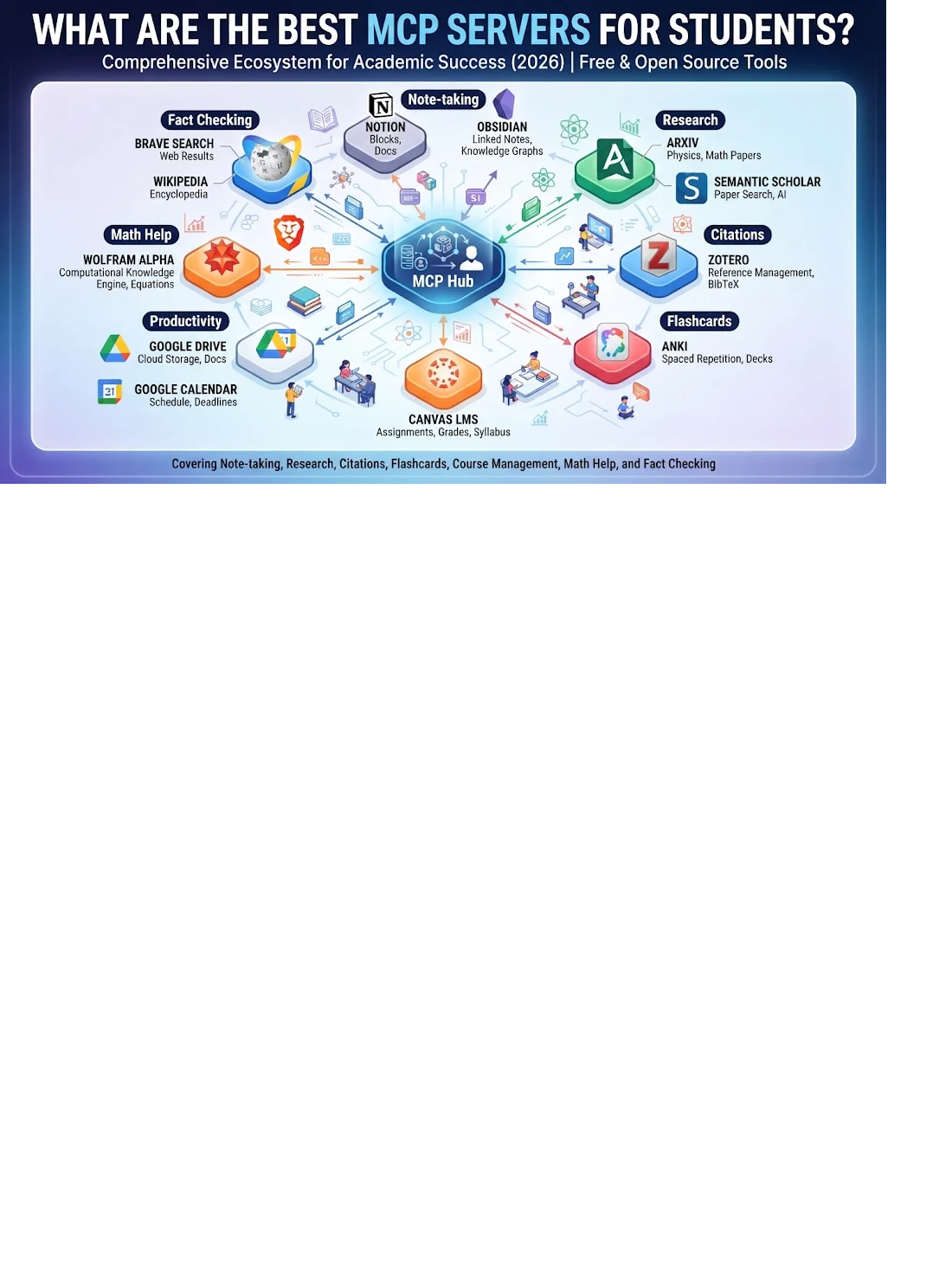
The best MCP servers for students in 2026 are
Notion,
Obsidian,
Zotero,
arXiv,
Semantic Scholar (paper search),
Anki,
Canvas LMS,
Google Drive and
Google Calendar,
Wolfram Alpha, and
Brave Search with
Wikipedia.
Together they cover note taking, research, citations, flashcards, course management, math help, and fact checking, and most of them are free or open source.
If you only want to start with three, pick Notion or Obsidian (your notes), Zotero (your sources) and Anki (your revision).
What Is an MCP Server? (Plain-English Explanation)
MCP stands for Model Context Protocol, an open standard that lets an AI assistant such as Claude talk to outside apps and data in a consistent way. Think of it like a USB-C port for AI: instead of every app needing its own custom connection, one standard plug lets your AI reach your notes, your papers, your calendar or your flashcards.
An MCP server is the small program or hosted service that sits between your AI and one specific tool. A Notion MCP server lets the AI read and write your Notion pages. A Zotero MCP server lets it search your reference library. You stay in one chat and the AI does the fetching.
Why should students care? Normal chatbots only know what they were trained on and what you paste in. With MCP, your AI can work from your lecture notes, your reading list and your deadlines, which means fewer made-up answers and far less copy-pasting.
How We Picked These Servers
We compared roughly ten pages currently ranking for education, research and general MCP lists, then filtered for what a student actually needs rather than what a school IT admin or professional developer needs. Each pick had to meet these tests:
- Solves a real student job: notes, sources, revision, deadlines, maths or fact checking.
- Free or has a free route: students are on a budget.
- Maintained and trustworthy: official or widely used open source, with a clear source.
- Beginner-friendly: realistic setup for someone who is not a developer.
Star counts and tool counts below come from published reviews and change quickly, so check each project page for the latest.
The Top 10 MCP Servers for Students
1. Notion MCP: Best for Notes, Planners and Study Databases
Best for: Students who already organize classes, assignments and project plans in Notion.
Notion offers a hosted MCP server, so connecting it is usually a few clicks rather than a coding job. Once linked, your AI can search your workspace, summarize a messy page of lecture notes, draft a revision plan and add tasks to your assignment tracker.
Try this prompt: “Look at my Biology 201 page, list every topic I marked ‘unsure’, and create a 7-day revision checklist in my study planner.”
Watch out for: Giving access to your entire workspace. Share only the pages or teamspaces you actually need.
2. Obsidian MCP: Best for Private, Local Note Taking
Best for: Students, especially postgraduates, who keep a markdown vault of notes and want to keep it on their own computer.
Obsidian stores notes as local files, which makes it a favourite for researchers who care about privacy. University library guides have even walked through connecting Claude Desktop to an Obsidian vault so the AI can read your whole knowledge base. Community MCP servers for Obsidian make this possible.
Try this prompt: “Find every note where I mention ‘supply and demand’ and build a one-page summary with links to the source notes.”
Watch out for: Community servers vary in quality. Pick one that is actively updated and has a read-only option if available.
3. Zotero MCP: Best for Citations and Literature Reviews
Best for: Anyone writing essays, a thesis or a literature review.
Zotero is a free, open-source reference manager that collects, organizes and cites sources. Zotero MCP servers let your AI search your library, pull items in by DOI or arXiv ID, and read your collections, so it can answer from the papers you actually saved instead of inventing references.
Try this prompt: “Search my ‘Dissertation’ collection for papers on remote learning outcomes and write a three-paragraph summary of where they agree and disagree.”
Watch out for: You will need your Zotero API key and library ID. Keep them private and never paste them into public repositories.
4. arXiv MCP: Best for STEM and Computer Science Papers
Best for: Engineering, physics, maths and computer science students who read preprints.
The arXiv MCP server lets your AI search arXiv, download papers and read them in the chat. In a March 2026 review it was the most-starred education-related MCP project, at around 2,400 GitHub stars, which signals strong community trust.
Try this prompt: “Find the three most-cited recent papers on transformer efficiency and explain each one at an undergraduate level.”
Watch out for: Preprints are not peer reviewed. Ask the AI to flag that, and cross-check important claims.
5. Semantic Scholar and Multi-Source Paper Search MCP: Best for Finding Academic Papers Across Fields
Best for: Literature reviews that go beyond one database, including medicine, biology and social science.
A general academic search server covers more than preprints. One popular open-source option combines arXiv, PubMed, bioRxiv, medRxiv, Google Scholar and Semantic Scholar behind a single interface, so you can ask one question and get results from several sources. Biomedical students can also look for a PubMed-focused server.
Try this prompt: “Search for systematic reviews on sleep and exam performance published in the last five years and list the main findings with links.”
Watch out for: Always open the original paper before citing it. AI summaries are a starting point, not a source.
6. Anki MCP: Best for Flashcards and Spaced Repetition
Best for: Medical, language and exam-prep students who live in Anki.
Anki MCP servers let your AI create decks, add cards, and manage notes. A widely used open-source option offers 20+ tools and a read-only safety mode. Turn lecture notes into flashcards in seconds, then let Anki’s spaced repetition do the memorizing.
Try this prompt: “Turn my Chapter 6 cardiology notes into 25 cloze flashcards and add them to a new deck called Cardio Week 6.”
Watch out for: Review AI-made cards before studying. A wrong card learned well is still wrong.
7. Canvas LMS MCP: Best for Tracking Assignments and Grades
Best for: Students whose university runs Canvas.
Canvas has the most competition of any learning management system in the MCP world, with several open-source servers. Student-facing features include checking upcoming assignments, reading course content, and viewing grades and discussions. One popular implementation advertises dozens of tools and permission-aware access, meaning the AI acts as you and sees only what you can see.
Try this prompt: “What assignments are due in the next 10 days across all my courses, sorted by deadline?”
Watch out for: Setup normally needs an API token, and some institutions restrict token creation for students. Check your university’s rules first. Moodle and D2L Brightspace have community servers too, though Brightspace options can be fragile.
8. Google Drive and Google Calendar MCP: Best for Notes, Files and Deadlines
Best for: Students who live in Google Docs, Sheets, Drive and Calendar.
Google Drive MCP gives your AI access to course files and shared documents, and Calendar MCP lets it look at your schedule. Together they work as a study-planner: ask the AI to find free evenings and block revision sessions around your classes.
Try this prompt: “Look at my calendar for next week and schedule four 90-minute study blocks for my statistics exam, avoiding my lectures.”
Watch out for: Grant the narrowest permissions available and review what the AI plans to change before approving it.
9. Wolfram Alpha MCP: Best for Maths, Science and Engineering
Best for: STEM students who need correct calculations, not confident guesses.
Language models can slip on arithmetic and symbolic maths. Wolfram Alpha MCP servers hand the computation to a dedicated engine, so your AI explains the concept while Wolfram does the exact numbers. There are several community implementations in different programming languages.
Try this prompt: “Solve this integral step by step, then verify the result with Wolfram Alpha.”
Watch out for: You may need a Wolfram API key, and free usage has limits. Still do the working yourself so you learn it.
10. Brave Search and Wikipedia MCP: Best for Fact Checking and Background Research
Best for: Every student, for quick research and verifying claims.
Search MCP servers connect your AI to live web results, which reduces out-of-date answers. Pair a search server such as Brave Search with a Wikipedia server for fast background context and terminology. Use them to warm up on a topic, then move to academic databases and Zotero for citable sources.
Try this prompt: “Give me background on the Bretton Woods system from Wikipedia, then find two recent web sources that discuss its legacy.”
Watch out for: Wikipedia and web pages are not citable academic sources for most courses. Use them to learn, not to reference.
Quick Comparison Table
| # | MCP Server | Best For | Typical Cost | Difficulty |
|---|---|---|---|---|
| 1 | Notion MCP | Notes, planners | Free Notion plan available | Easy |
| 2 | Obsidian MCP | Private local notes | Free | Medium |
| 3 | Zotero MCP | Citations, literature reviews | Free (API key needed) | Medium |
| 4 | arXiv MCP | STEM preprints | Free | Medium |
| 5 | Semantic Scholar / paper search | Multi-field paper search | Free | Medium |
| 6 | Anki MCP | Flashcards | Free | Medium |
| 7 | Canvas LMS MCP | Assignments, grades | Free (token needed) | Medium to hard |
| 8 | Google Drive + Calendar | Files and scheduling | Free Google account | Easy |
| 9 | Wolfram Alpha MCP | Maths and science | Free tier with limits | Medium |
| 10 | Brave Search + Wikipedia | Fact checking | Free tier available | Easy |
Pricing and plans change. Confirm on each provider’s site before you rely on it.
Best MCP Stacks by Student Type
- High school and first-year undergrad: Notion + Google Calendar + Anki.
- Research-heavy humanities or social science: Zotero + Semantic Scholar + Obsidian.
- STEM and engineering: arXiv + Wolfram Alpha + Notion.
- Medical and exam-prep: Anki + paper search (PubMed) + Notion.
- Postgraduate and thesis writers: Zotero + Obsidian + paper search + arXiv.
Start with two servers, not ten. Each one adds setup time and extra permissions to manage.
How to Install an MCP Server (Beginner Steps)
There are two common routes.
Route 1: Hosted connectors (easiest). Servers like Notion and Google Drive are offered as hosted connections. In your AI app, open the settings area for connectors or integrations, choose the service, sign in and approve access. No coding needed.
Route 2: Local servers (for open-source tools). Tools such as arXiv, Zotero, Anki and Obsidian servers usually run on your own computer.
- Install the prerequisite named in the project’s README (commonly Node.js or Python with
uv). - Add the server to your AI app’s MCP configuration file. A typical entry looks like this:
{
  "mcpServers": {
    "arxiv-mcp-server": {
      "command": "uv",
      "args": ["tool", "run", "arxiv-mcp-server"]
    }
  }
}- Add any API keys the server needs, such as a Zotero key, in the environment settings the README describes.
- Restart the app, then test with a simple request like “List my Zotero collections.”
Commands differ per project and change over time, so always copy the current install command from the project’s own page.
Safety and Privacy: Read This Before You Connect Anything
MCP servers can read, and sometimes change, your data. Protect yourself with these habits:
- Use trusted sources. Prefer official servers or well-maintained open-source projects with visible code and recent updates.
- Grant the minimum access. Connect one folder, one collection or one workspace, not everything.
- Turn on read-only mode when the server offers it, at least at first.
- Guard API keys and tokens. Never share them or commit them to GitHub.
- Respect university rules. Using your school’s Canvas or library data with outside AI tools may be restricted. Check your policy.
- Follow academic integrity rules. Using AI to understand, organize and revise is very different from submitting AI-written work. Know your institution’s policy.
- Verify before you cite. AI can still misread a paper. Open the source yourself.
Bonus MCP Servers Worth Knowing
- GitHub MCP: for computer science students managing code and projects.
- Microsoft Learn MCP: official documentation access for Microsoft technologies.
- Panopto and Wiley: announced as pre-built education connectors, mainly useful if your university provides access to recorded lectures or Wiley content.
- Udemy Business MCP: an official server aimed at learning content inside AI workflows (business accounts).
- Interactive coding-practice servers: some offer step-by-step hints before revealing solutions, which supports real learning.
Frequently Asked Questions
What is an MCP server for students?
It is a connector that lets an AI assistant work with your study tools, such as notes, reference libraries, flashcards, calendars and learning platforms, from one chat window.
Are MCP servers free for students?
Many are. Most open-source servers cost nothing. You may still need free accounts or API keys, and some services such as Wolfram or Notion have paid tiers with extra limits.
Do I need to know how to code to use MCP servers?
Not for hosted connectors like Notion or Google Drive. Local open-source servers need basic comfort with a configuration file and a terminal, but good README guides make it manageable.
Which MCP server should a beginner install first?
Notion or Google Calendar and Drive, because they connect through simple sign-in screens and solve an everyday problem straight away.
Are MCP servers safe?
They can be, if you use trusted sources, grant minimal access, enable read-only mode where possible and protect your keys. Treat them like any app that can see your data.
Can MCP servers help me write a thesis or literature review?
Yes. Zotero, arXiv and paper-search servers help you find, organize and summarize sources. You still need to read the papers and write the analysis yourself.
Which AI apps support MCP?
Claude supports MCP, and the standard is also adopted by a growing number of other AI assistants and coding tools. Check your app’s documentation for exactly how to add servers.
Can MCP servers help me cheat?
They are tools, and misuse is on you. Using them to organize notes and study smarter is fine. Submitting AI-generated work as your own breaks most academic integrity policies.
Final Thoughts
MCP is moving fast, and students are in a great position to benefit. Start small: connect your notes, connect your sources, and add flashcards for revision. Keep a read-only mindset, verify everything you cite, and let the AI handle the busywork so you have more time to actually learn.
Which MCP server are you trying first? Tell us in the comments, and bookmark this guide because we update it as new student-friendly servers appear.